
The challenges of transitioning from spreadsheets to CRM for sales and marketing teams
Making the jump from spreadsheets to a CRM system is a turning point for growing sales and marketing teams. And the benefits are pretty clear: Better organization, the ability to automate tasks, and improved collaboration across your organization.
But here’s what catches many teams off guard: The transition itself can be far more involved than they might initially anticipate.
The reality is that teams that prepare for these challenges dramatically increase their odds of a smooth implementation. Those who don’t often find themselves struggling months into the process, wondering why adoption is lagging. Or why their data looks messier in the new system than it did in Excel or Google Sheets.
Having witnessed hundreds of migrations to Google Sheets and Excel CRM alternatives, the team at has compiled this guide to help you understand the real challenges teams encounter when moving from spreadsheets to a CRM, and how to navigate them successfully.
Key takeaways
- Data quality issues hidden in spreadsheets surface during migration and require up-front cleaning up.
- Implementation timelines typically run 30%-50% longer than initial estimates due to testing and training needs.
- Team adoption requires intentional change management—not just software training—to succeed.
Spreadsheet to CRM migration challenges for sales and marketing teams
Here’s a closer look at some of the most common challenges sales and marketing teams face when switching to a CRM from spreadsheets.
Challenge 1: Discovering data quality issues you didn’t know existed
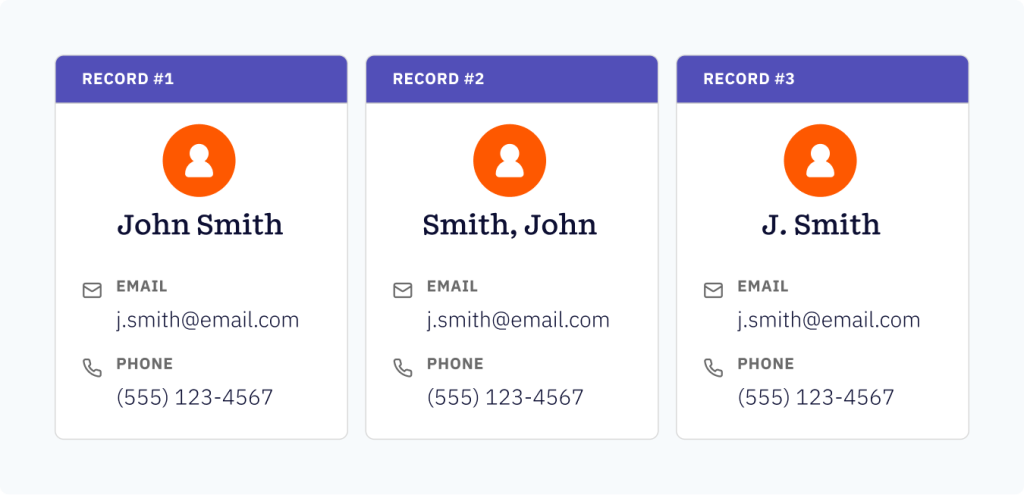
Spreadsheets are remarkably forgiving. Multiple people can enter data however they want—”John Smith” in one cell, “Smith, John” in another, “J. Smith” in a third. There’s also the risk of different date formats, inconsistent industry labels, and duplicates scattered across multiple files.
Everything looks fine until you try to migrate it to a CRM. That’s when teams noticed problems everywhere.
Why spreadsheets hide data problems
The flexibility that makes spreadsheets useful for early-stage businesses becomes a liability when those businesses begin to scale. Without enforced data standards, inconsistencies multiply invisibly.
According to 2024 , 24% of CRM administrators report that less than half their data is accurate and complete. Many of these issues originate from pre-migration spreadsheet practices.
The problem is that spreadsheets don’t validate data as it’s entered. There’s no warning when someone types “Michigan” instead of “MI.” You won’t receive an alert when duplicate records exist across different tabs or files. These problems compound over time, quietly creating a data foundation that’s shakier than it appears.
As a result, teams often don’t see the cracks until they attempt to move the whole thing over to a different system.
The duplicate records revelation
One of the biggest surprises for teams is often the sheer volume of duplicate records that exist across their spreadsheet ecosystem.
Sales might maintain one customer list, while marketing has another, and customer service keeps a third. When you consolidate everything into a single CRM, suddenly you’re looking at the same customer appearing five or six times, with slightly different information in each record.
The question then becomes, “Which one is correct?”
Many organizations discover during migration that their records were already outdated or duplicated before the transition even began.
Inconsistent formatting across multiple files
Spreadsheets allow complete formatting freedom. Phone numbers might appear as (555) 123-4567 in one file, 555-123-4567 in another, and 5551234567 in a third. States could be abbreviated or spelled out. Job titles might be capitalized differently across files.
Who cares, right? It’s all readable by humans.
But CRM systems need consistency to function properly—for reporting, automation, segmentation, and search. What worked fine when humans were visually scanning spreadsheet rows becomes problematic when you need the system to automatically route leads or trigger workflows.
How to overcome the data quality challenge
Conduct a data audit before migrating your data from your spreadsheets to the CRM system. Export all your spreadsheet data and analyze it systematically, taking note of the following:
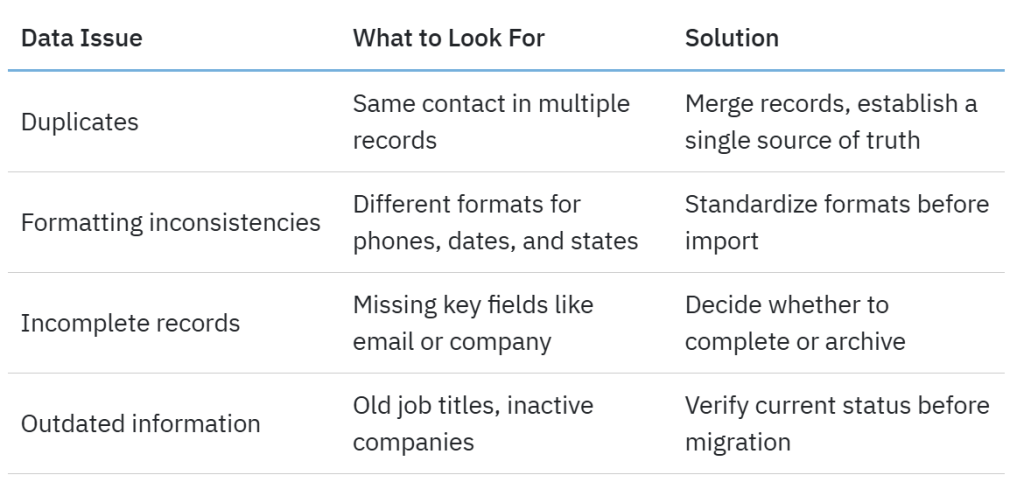
The cleanup work happens before migration, not after. Teams that try to “fix it once it’s in the CRM” typically never get around to it. They’re often too busy learning the new system, managing day-to-day work, and putting out fires—so the data stays messy.
Challenge 2: Underestimating migration timeline requirements
Ask most teams how long they think CRM implementation will take, and they’ll estimate two to four weeks. But the reality is that it can take two to four months to properly migrate data from spreadsheets and implement a CRM solution.
This isn’t because CRM systems are inherently difficult to set up—it’s because teams underestimate the nontechnical work involved in successful transitions. This includes planning, discussions, and getting everyone on the same page, none of which should be rushed.
The planning phase can take longer than expected
Before any data moves, teams need to answer fundamental questions, such as:
- What fields do we actually need?
- How should our sales stages be structured?
- What workflows need to be automated?
- Who needs access to what?
These may be simple questions, but the answers aren’t always as simple.
These discussions take time, especially when sales and marketing haven’t previously aligned on definitions and processes. One team’s “qualified lead” might be another team’s “prospect.” Getting everyone on the same page about these fundamentals can’t be rushed—though many teams try anyway, leading to confusion and rework later.
The CRM migration testing that teams often skip
It’s not uncommon for data migration projects to exceed their budget and timeline due to unforeseen complications. In most instances, these challenges could have been caught during proper testing phases.
Testing may feel like wasted time when you’re eager to go live—but it’s not.
Smart teams run test migrations with small data samples first. They verify that the data maps correctly to the new system and that integrations with email and other tools work properly. Testing also helps them verify that reports pull accurate information and ensure automation triggers fire as expected.
Skipping this testing phase to save time invariably costs more time later when issues surface after the full migration. By that stage, thousands of records have already been imported incorrectly, workflows are already broken, and frustrated team members are already losing confidence in the new system.
CRM training and adoption periods
Software training is just one piece of the puzzle. Teams also need time to adjust to new workflows, break old habits, and internalize new processes.
Research highlighted by Harvard Business Review shows that when fail to meet their objectives, it is often because organizations underinvest in change management and team adoption.
How to overcome the migration timeline challenge
Build realistic project timelines that account for the actual work involved, including:
- 2 to 3 weeks for planning and requirements gathering.
- 1 to 2 weeks for data clean-up and preparation.
- 1 week for test migration and validation.
- 2 to 3 weeks for team training and gradual rollout.
- 4 to 6 weeks for full adoption and workflow optimization.
These timelines vary based on team size and data complexity, but they provide a more realistic foundation than the “two-week quick setup” many teams initially envision. Some platforms designed with user-friendliness in mind can shorten these timelines—but adequate planning and adoption time remains essential regardless of platform choice.
Challenge 3: Getting team buy-in and driving adoption
You can have the perfect CRM implementation from a technical standpoint, but if your team doesn’t actually use it, the project fails.
This is where many well-planned transitions hit unexpected roadblocks. The technical stuff worked, the data migrated cleanly, and the integrations function properly—but nobody’s logging into the system.
Why sales and marketing teams might resist change
Your sales and marketing teams may already have systems that work for them—even if those systems are just elaborate spreadsheets and personal notes. Asking them to change these established workflows could feel like you’re asking them to slow down and relearn their jobs.
When you’re measured on quota attainment or campaign performance, adopting a new system represents a temporary productivity hit during the learning curve. That hit comes directly out of your results for that quarter—your commission, bonus, and performance review.
According to , complexity and usability concerns are often among the top reasons for low user adoption, with many users finding CRM systems difficult to navigate—especially when transitioning from the simplicity of spreadsheets.
The CRM learning curve adjustment period
Even user-friendly CRMs require some adjustment time. Team members need to learn where information lives, how to update records properly, and which workflows to follow.
During this period, it’s common for people to feel slower and less confident than they did with their old spreadsheet system. That feeling can be frustrating and may lead to team members questioning whether this new system is actually better.
This adjustment period is real and should be acknowledged rather than dismissed. Teams that pretend there won’t be a learning curve set unrealistic expectations that could affect adoption negatively when reality hits.
Breaking old spreadsheet habits
For weeks or even months after CRM implementation, some team members will maintain “backup” spreadsheets “just in case.” These parallel systems undermine the entire purpose of CRM, which is to establish a single source of truth for customer data.
When different team members maintain different systems, data fragments—again. Your CRM data becomes outdated, reinforcing the team’s belief that they need their spreadsheets, and creating a vicious cycle that’s hard to break.
How to overcome the CRM adoption challenge
Implement change management strategies that address the human side of transitions, such as:
- Involve team members early: Include sales and marketing team members in planning decisions. When people help design the new system, they’re more invested in its success. They feel ownership rather than resentment.
- Make the “why” clear: Don’t just explain how to use the CRM. Explain why the change matters and how it makes their jobs easier in the long run. Share concrete examples relevant to their daily work.
- Provide adequate training: Go beyond one-time training sessions. Offer ongoing support, quick-reference guides, and accessible help resources. Make it easy for your team to get unstuck without feeling embarrassed for asking.
- Celebrate early wins: Publicly recognize team members who adopt the new system successfully and share specific examples of how it’s helping them. These stories are contagious—in a good way.
- Set clear expectations: Establish a sunset date for spreadsheet use and communicate it clearly. Make it known that the CRM is now the official system of record. Then stick to it.
Platforms specifically designed for ease of use can significantly reduce adoption friction. But even the most intuitive systems require intentional change management to ensure team buy-in.
Challenge 4: Navigating the spreadsheets vs. CRM workflow adjustment period
Beyond the learning curve, teams face a period where established workflows need to be translated into the new CRM environment. This transition period can bring temporary disruption that many organizations don’t adequately prepare for.
Temporary productivity dips during transition
Even after training, teams typically experience a slight productivity dip during the first four to eight weeks of CRM use. Tasks that took two minutes in a familiar spreadsheet might take five minutes in an unfamiliar CRM.
Multiply that across dozens of daily tasks and hundreds of records, and the time adds up quickly.
that sales reps spend only about 30% of their week actually selling, with the rest spent on administrative and research-related tasks. During CRM transitions, this rate could decrease temporarily as team members navigate new processes.
This productivity dip is temporary, but it’s real. Organizations should budget for it rather than being surprised when weekly metrics dip during the transition month. Surprised managers start panicking and pressuring teams, who might then be inclined to abandon the new system.
Managing parallel systems when migrating to CRM
Sometimes phased transitions make sense, moving one team or one process at a time rather than everything simultaneously. While this approach can reduce risk, it creates its own challenge: maintaining data consistency across two systems during the transition.
When some team members use the CRM while others still use spreadsheets, someone needs to manage data synchronization manually. This interim state should be as brief as possible to minimize confusion and redundant work.
Adapting established processes to new tools
Spreadsheet-based processes often include workarounds and informal steps that team members barely think about anymore. Moving to an Excel or Google Sheet CRM alternative requires documenting these processes explicitly and deciding which steps to formalize, which to eliminate, and which to automate.
This process translation work is valuable, as it often reveals inefficiencies in existing workflows. But it takes time and focused attention that many teams don’t allocate up front.
How to overcome the adjustment period challenge
Implement phased rollout strategies that minimize disruption. For example:
- Start with core functionality: Don’t try to replicate every spreadsheet feature immediately. Begin with essential workflows and add complexity gradually. Walk before you run.
- Designate system champions: Identify enthusiastic early adopters who can help their peers navigate challenges and answer questions. These champions become your frontline support team—often more effective than official help desk tickets.
- Schedule a dedicated transition time: Give team members protected time to learn the system without feeling pressured by their regular workload. An hour a day for two weeks beats an all-day training session followed by immediate return to full capacity.
- Measure and communicate progress: Track adoption metrics and share improvements as they emerge, reinforcing that the temporary discomfort is yielding results. People need to see the light at the end of the tunnel—and know they’re moving toward it.
- Iterate based on feedback: Stay flexible during the early weeks. If a workflow isn’t working as planned, adjust it rather than forcing team members to work around it. Your initial setup won’t be perfect, and that’s okay.
Challenge 5: Technical CRM migration hurdles
While data quality issues are the most common challenge, the technical aspects of migration also present obstacles—particularly for teams without dedicated IT resources. And most small to mid-sized businesses don’t have dedicated IT teams.
Data mapping between different systems
Every CRM structures data slightly differently. A field called “Company” in your spreadsheet might map to “Account Name” in the CRM. Contact information might be split across multiple fields instead of living in a single cell. Deal stages need to be translated into the new system’s pipeline structure.
This mapping work is detailed and consequential. Map a field incorrectly, and you could end up with contact names in the company field or phone numbers in the email field. Mismatches from one system to another can quickly trip up your migration project.
Field matching and customization needs
Default CRM fields don’t always match what your business tracks. If you’ve been tracking custom information specific to your industry or sales process, you’ll need to create custom fields in your new CRM and ensure your spreadsheet data maps to them correctly.
This customization is necessary—one size doesn’t fit all businesses—but it can add complexity to the migration process and requires careful planning.
Integration with existing tools
Your CRM doesn’t exist in isolation. It needs to connect with your email system, marketing automation platform, calendar, support system, and potentially dozens of other tools.
Each integration represents a potential technical challenge that needs testing and validation. And platform choice matters.
While data migrations typically involve challenges, the difficulty level varies significantly based on your platform choice. Modern, well-designed CRMs with robust integration ecosystems can dramatically simplify this technical work compared to legacy systems that require custom development for each connection.
How to overcome CRM migration mapping and integration challenges
Follow a structured migration preparation framework. You can also break this process down into manageable phases.
Phase 1: Pre-migration preparation
- Document all data fields from existing spreadsheets.
- Identify which fields are critical vs. nice-to-have.
- Create a field mapping spreadsheet showing old to new structure.
- Test migration with a small sample dataset (50-100 records).
Phase 2: Test migration execution
- Import sample data and validate field mapping.
- Check for data integrity issues.
- Test integrations with key tools.
- Verify that workflows and automation trigger correctly.
Phase 3: Full migration
- Schedule migration during low-activity periods.
- Maintain spreadsheet backup until migration is validated.
- Run data validation checks immediately after import.
- Test critical workflows before announcing the system is live.
Phase 4: Post-migration validation
- Verify record counts match between old and new systems.
- Spot-check individual records for accuracy.
- Test reporting to ensure data is accessible.
- Confirm integrations are functioning properly.
Teams without technical expertise should consider CRM platforms known for easier implementations or invest in implementation support to navigate these technical aspects successfully. Trying to DIY complex migrations without proper expertise could result in extended timelines, data issues, and frustrated teams.
Challenge 6: Understanding the true investment required
The sticker price on CRM software is just the beginning. Teams consistently underestimate the full investment required for successful implementation.
Costs beyond the CRM software subscription
Monthly or annual CRM licensing fees are the visible costs. Here are some of the less visible ones.
- Implementation and setup: Whether you use internal resources or external consultants, someone needs to configure the system, migrate data, and set up integrations. This can range from a few thousand dollars for straightforward implementations to tens of thousands for complex ones.
- Training investment: Beyond initial training sessions, there’s ongoing education as team members forget features, new employees join, or the system adds capabilities.
- Data clean-up: If your data requires significant cleaning before migration, expect to invest time (internal resources) or money (external data services) to get it migration-ready.
- Integration costs: While many integrations are included with CRM subscriptions, some require additional fees or development work to connect properly.
by McKinsey in 2021 suggested that inefficiencies in migration execution would likely waste approximately $100 billion over the next three years alone. That number underscores how significantly organizations underestimate the full cost of transitions.
Time investment for implementation and training
Time is money, particularly when it comes to sales and marketing team bandwidth.
Consider these time-related factors:
- The hours spent planning and preparing for migration.
- The time team members spend in training sessions.
- Productivity loss during the adoption period.
- Ongoing time for system administration and maintenance.
For a 10-person sales team, the time investment across all team members during a two-month implementation might total 400-600 hours—equivalent to three to four months of one full-time employee. That’s assuming things go smoothly.
Resource allocation during migration
Someone on your team needs to manage the implementation project. This often falls to a sales manager, marketing director, or operations person who may already have a full plate.
Without dedicated project management, implementations drag on as they compete for attention with daily priorities. The “urgent” always beats the “important” when nobody owns the “important” exclusively.
How to overcome the investment underestimation challenge
Create comprehensive budget planning that accounts for the complete investment:
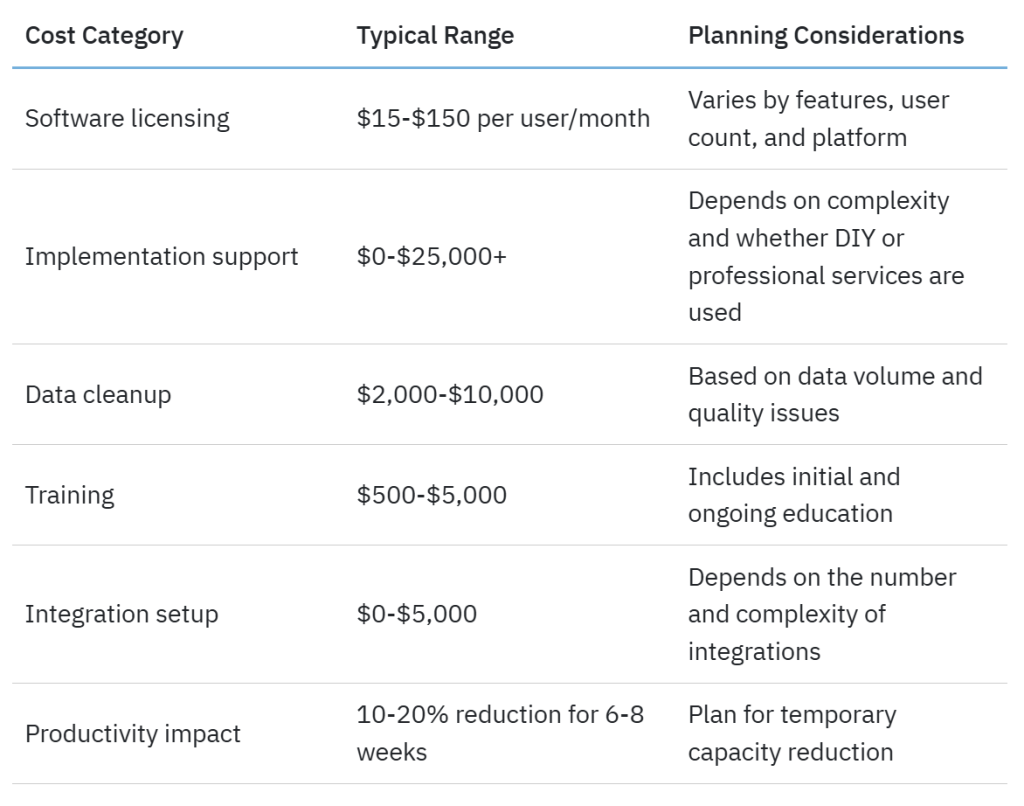
The investment level varies considerably based on the CRM choice. Platforms designed for easier implementation and user adoption can significantly reduce these costs compared to complex enterprise systems requiring extensive customization and professional services.
When calculating ROI, remember that CRM delivers an average ROI of , according to Nucleus research, with businesses seeing an average 29% increase in sales after implementation. The short-term investment yields long-term returns when executed properly.
Setting up your spreadsheet to CRM migration for success
Understanding these challenges is half the battle. Here’s how to position your team for a successful transition from spreadsheets to CRM.
Choosing a CRM designed for easier transitions
Not all CRMs are created equal when it comes to implementation difficulty. Some are genuinely easier to set up and use than others. That difference matters.
When evaluating platforms, consider:
- Setup complexity: Can your team configure it independently, or does it require extensive professional services? If the answer is “professional services required,” factor that into your budget and timeline.
- Data import tools: Does the platform offer guided import processes with field mapping assistance? Or are you on your own with CSV files and cryptic error messages?
- User interface design: Is the system intuitive enough that team members can find what they need without constant training? Test this yourself—if you can’t figure it out in 10 minutes, your team won’t either.
- Integration ecosystem: Are pre-built integrations available for the tools you already use? Native integrations almost always work better than third-party connections or custom builds.
- Support resources: What level of implementation support and ongoing help is included? “Email support within 24 hours” sounds great until you’re stuck on day two of your migration.
Platform choice significantly impacts every challenge discussed in this guide. A well-designed, user-friendly CRM won’t eliminate these challenges entirely—but it can reduce their severity substantially.
Pre-migration preparation checklist
Before beginning your migration, ensure you’ve completed these essential pre-migration steps:
- Data audit completed: You’ve identified quality issues, duplicates, and outdated records.
- Stakeholder buy-in secured: Key team members understand the “why” and support the change.
- Requirements documented: You’ve defined needed fields, workflows, and integrations.
- Timeline established: You’ve set realistic expectations for each phase of implementation.
- Training plan created: You’ve scheduled initial training and planned for ongoing support.
- Project manager assigned: Someone owns the implementation project and can dedicate adequate time.
- Test migration scheduled: You’ve planned a trial run with sample data before the full migration.
- Success metrics defined: You know how you’ll measure whether the implementation succeeds.
Building your CRM implementation plan
Your implementation plan should outline the what and when for each CRM migration phase.
Here’s a realistic framework you could work with. This timeline represents a moderate-complexity implementation. Adjust it based on your organization’s size, data complexity, and technical resources. But don’t adjust it too aggressively—cutting corners here costs more later.
Week 1 to 2: Planning phase
- Finalize CRM selection and contract.
- Assemble the implementation team.
- Document current workflows and pain points. Define desired future state.
Week 3 to 4: Preparation phase
Clean and prepare data for migration. Configure basic CRM settings. Set up user accounts and permissions. Create initial field mapping.
Week 5: Testing phase
Execute test migration with sample data. Validate data accuracy and field mapping. Test critical integrations. Identify and resolve issues.
This week saves you months of pain later. Don’t skip it.
Week 6 to 7: Training phase
Conduct team training sessions. Create quick-reference materials. Designate system champions. Practice with a live system using test data.
Week 8: Migration phase
Execute full data migration. Validate migration success. Final testing of workflows. Announce system go-live.
Week 9 to 12: Adoption phase
Monitor usage and address issues quickly. Provide ongoing support and coaching. Gather feedback and make adjustments. Celebrate wins and recognize early adopters.
Frequently asked questions
1. What’s the biggest challenge teams face when moving from spreadsheets to CRM?
Data quality issues are typically the biggest surprise. Information that looked fine in spreadsheets—duplicates, inconsistent formatting, outdated records—becomes glaringly obvious during CRM migration. The challenge isn’t just technical; it’s that cleaning this data takes significant time that teams don’t anticipate. Often extending implementation timelines by weeks or months.
2. How long does a typical CRM implementation take?
Most implementations take two to four months when accounting for planning, data preparation, testing, training, and adoption. While basic technical setup might be completed in a few weeks, successful implementations require adequate time for team adaptation and workflow optimization. Rushing this process is a primary reason why to achieve their planned objectives.
3. Why do some CRM implementations fail while others succeed?
Success comes down to three factors: Adequate planning, realistic expectations, and strong change management. Failed implementations typically skip proper data preparation, underestimate training needs, or fail to secure team buy-in. The choice of CRM platform also matters significantly—Systems designed for user adoption and ease of use have substantially higher success rates than complex platforms requiring extensive customization.
4. Can we avoid workflow disruption during the transition?
Some disruption is inevitable. But you can minimize it through phased rollouts, adequate training, and choosing user-friendly platforms. Expect a temporary 10% to 20% productivity dip during the first four to eight weeks as teams adjust. Rather than trying to eliminate this adjustment period—which you can’t—plan for it by scheduling implementation during slower business periods and providing dedicated time for learning.
5. How do we know if our data is ready for CRM migration?
Run a data audit checking for duplicate records across spreadsheets, inconsistent formatting (phone numbers, dates, states), incomplete records missing critical fields, and outdated information. If more than 20% of your records have these issues, invest in a data clean-up effort before migration. Attempting to “fix it after” rarely happens, and teams get too busy with day-to-day work once the system is live.
The transition is worth the effort—if you plan for it
The transition from spreadsheets to CRM comes with real challenges: Data quality surprises, longer timelines than expected, adoption hurdles, workflow adjustments, technical complexities, and hidden costs.
These challenges catch teams off guard, not because they’re insurmountable, but because organizations tend to underestimate them during planning.
Here’s the good news: Teams who understand these challenges up front can prepare effectively and navigate them successfully. The key lies in realistic planning, adequate data preparation, intentional change management, and choosing a CRM platform designed with implementation ease in mind.
Once through the transition period, teams benefit from centralized data, automated workflows, better collaboration, and insights that were impossible with spreadsheets. The increase in sales that businesses often see after successful CRM implementation demonstrates that the long-term value far outweighs the short-term challenges.
Your spreadsheet system got you this far. But a properly implemented CRM will take you further if you approach the transition with preparation, patience, and realistic expectations about the work involved.
was produced by and reviewed and distributed by Â鶹ԭ´´.