
CRM planning and implementation for small businesses: A guide for teams with limited technical resources
It鈥檚 11 p.m. on a weeknight. You鈥檙e at your desk researching customer relationship management (CRM) solutions for the third time this month. Your sales team is growing, customer information is scattered across spreadsheets and email threads, and you鈥檙e wondering how to transform your business processes without breaking the bank鈥攐r needing a computer science degree.
You鈥檙e not alone. This is the reality for countless small business owners who recognize that CRM is critical to growth, yet feel overwhelmed by the technical complexity that seems to surround it.
贬别谤别鈥檚 the challenge: Many small businesses have no dedicated IT staff, yet use CRM systems. That gap between need and capability creates a unique implementation challenge for nontechnical teams. However, what鈥檚 crucial to understand is that your small business actually comes with advantages that larger organizations often lack. You possess agility, direct decision-making skills, and a personal investment in your success.
The opportunity is real and measurable. Businesses that implement CRM systems see a per salesperson, and using CRM are more likely to exceed their sales goals than those without it. The question isn鈥檛 whether you should implement a CRM鈥攊t鈥檚 how to do it successfully without technical expertise.
贬别谤别鈥檚 鈥檚 step-by-step approach to CRM planning and implementation, specifically designed for nontechnical small business teams. Whether you鈥檙e managing customer relationships through spreadsheets, working with tight budget constraints, or scaling rapidly, you鈥檒l find a roadmap tailored to your situation.
Key Takeaways
- Small businesses without dedicated IT staff can successfully implement CRM systems by choosing user-friendly solutions and following a structured, phased approach.
- The key to nontechnical CRM implementation is to start simple, build gradually, and prioritize ease of use over advanced features.
- Success depends on realistic planning, proper team training, and building a support network鈥攏ot technical expertise.
- Businesses that implement CRM systems see a 41% increase in revenue per salesperson and are 86% more likely to exceed sales goals.
Understanding your small business CRM journey
Before you dive into CRM selection and implementation, successful small businesses must first understand where they鈥檙e starting from and where they need to go. Understanding your current state and resources helps you make better CRM choices and execute the implementation more successfully. This clarity is the foundation for everything that follows.
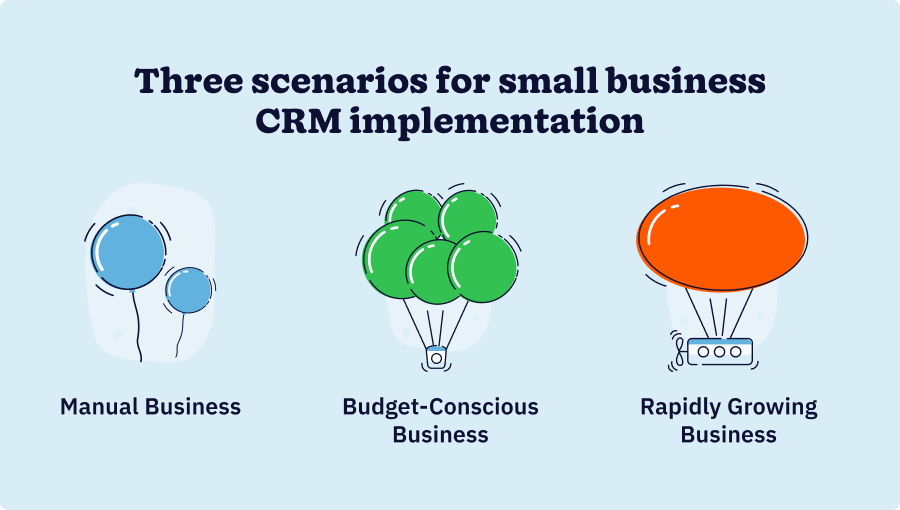
Most small businesses fall into one of three categories鈥攖he manual business, the budget-conscious business, and the rapidly growing business鈥攁nd each requires a different implementation approach.
Nontechnical teams implementing CRM systems typically face remarkably similar challenges. These can include scattered customer data, a lack of confidence in new technology, concerns about long-term costs, or worries about disrupting your team during implementation.
While every small business has a unique starting point, they all share common success factors: choosing the right approach, planning strategically, and building the right support network. 贬别谤别鈥檚 what matters most: aligning your timeline expectations with both business reality and learning curves.
The framework and playbook in this guide are designed to work regardless of where you鈥檙e starting from.
Strategic CRM planning: The nontechnical small business framework
Businesses that invest time in strategic planning are significantly more likely to succeed. Four weeks of up-front planning prevent costly mistakes and set realistic expectations for implementation.
Your small business doesn鈥檛 need the complexity of enterprise-level planning. Nontechnical teams, in particular, need a straightforward approach that focuses on business results, rather than technical specifications.
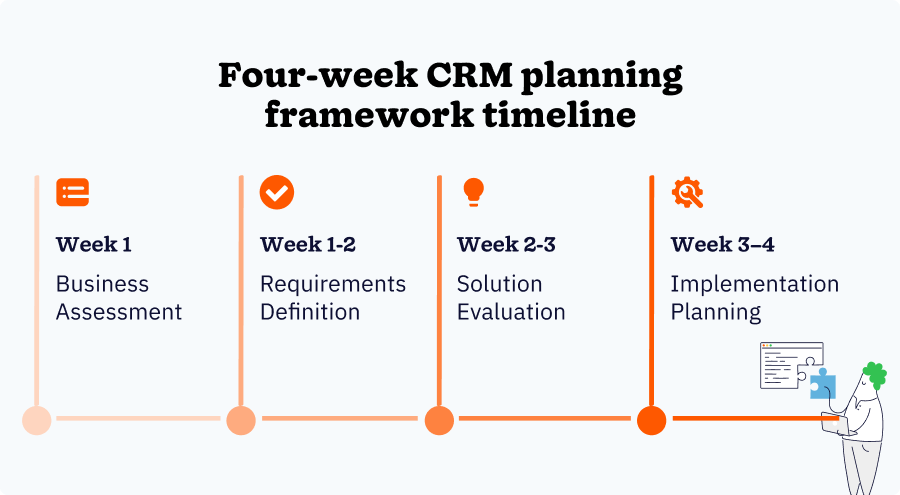
The framework below is designed to be completed in about four weeks, with each phase building on the previous one.
Phase 1: Business assessment (Week 1)
This phase starts with understanding your current state. What systems and processes are you using now? Where are you losing time, money, or opportunities? Be specific.
Next, think about where you expect to be in six, 12, and 24 months from now. Equally important is a reality check on your resources. What time, budget, and technical resources do you actually have?
Phase 2: Requirements definition (Week 1-2)
Your second phase defines what you need from a CRM. Start by prioritizing features based on immediate business impact and ease of use. Identify what tools your CRM must work with. Determine who will use the CRM and assess their technical comfort levels.
Define how you鈥檒l measure CRM implementation success and be clear about your technical limitations.
Phase 3: Solution evaluation (Week 2-3)
Here, the focus is on finding the right CRM. Prioritize ease of use, a visually appealing interface, quick setup, excellent support, and scalability. Use free trials strategically to focus on core features, instead of advanced customization.
Consider the total cost, including subscription fees, training, support, and maintenance expenses. Have multiple team members test the interface for intuitiveness.
Phase 4: Implementation planning (Week 3-4)
Phase four is where you鈥檒l create realistic timelines, ensuring that you account for learning curves. Determine who will lead the project and who will support the various teams. Identify potential technical challenges and plan workarounds.
Prepare your team for the transition with emphasis on support and training.
The nontechnical small business CRM planning and implementation playbook
A detailed week-by-week breakdown removes guesswork and keeps your team on track through small, manageable wins. This structure is what separates successful implementations from failed ones.
With planning complete and strategy defined, here鈥檚 how to execute your CRM implementation efficiently and effectively.
Before You Start: Pre-Implementation Checklist
- Organize existing customer data in a simple spreadsheet format
- Explain the why, what, and when to your team using simple, nontechnical language
- Ensure all users have the necessary accounts using guided setup wizards
- Keep existing processes running until the new system is proven
- Identify vendor support resources and community forums
Week 1: Foundation Setup
- Day 1: Create your CRM account using the guided setup wizard. Complete basic company information using the provided templates. Explore the interface without making changes.
- Day 2: Import a small test batch of customer data using the import wizard. Verify data was imported correctly. Practice basic navigation and customer lookup.
- Days 3-4: Import the remaining customer data in small batches. Set up your basic sales pipeline using visual drag-and-drop tools. Create user accounts for team members.
- Days 5-7: Start using your CRM daily with basic contact management. Practice adding notes and updating customer information. Schedule follow-up tasks using the built-in reminder system.
Week 2: Process Integration
- Days 8-10: Set up basic sales processes using prebuilt templates. Create simple opportunity tracking, using a visual pipeline. Practice moving deals through pipeline stages.
- Days 11-12: Set up basic email integration. Test email sync and practice sending emails from CRM. Set up simple automation using prebuilt workflow templates.
- Days 13-14: Begin full daily usage with all team members. Collect initial feedback and address simple issues. Use vendor support for any questions.
Week 3: Optimization and Expansion
- Days 15-17: Refine processes based on initial usage and feedback. Add additional fields or pipeline stages as needed. Practice using basic reporting templates.
- Days 18-19: Add simple integrations, such as calendars or email marketing, if needed. Set up basic dashboards using prebuilt templates. Create simple team training materials with screenshots.
- Days 20-21: Conduct team training sessions using vendor resources. Practice advanced features, such as bulk actions and filtering, to enhance your productivity. Set up simple data backup procedures.
Week 4: Measurement and Refinement
- Days 22-24: Set up basic reporting using prebuilt templates. Review key metrics, such as data completeness and user adoption. Establish a straightforward weekly review process to maintain the health of your CRM.
- Days 25-26: Conduct user feedback sessions with a simple questionnaire. Address any remaining usability issues. Document simple troubleshooting solutions.
- Days 27-28: Plan next phase improvements based on team comfort level. Schedule regular check-ins with vendor support. Create a simple maintenance checklist.
Avoiding common small business CRM implementation pitfalls
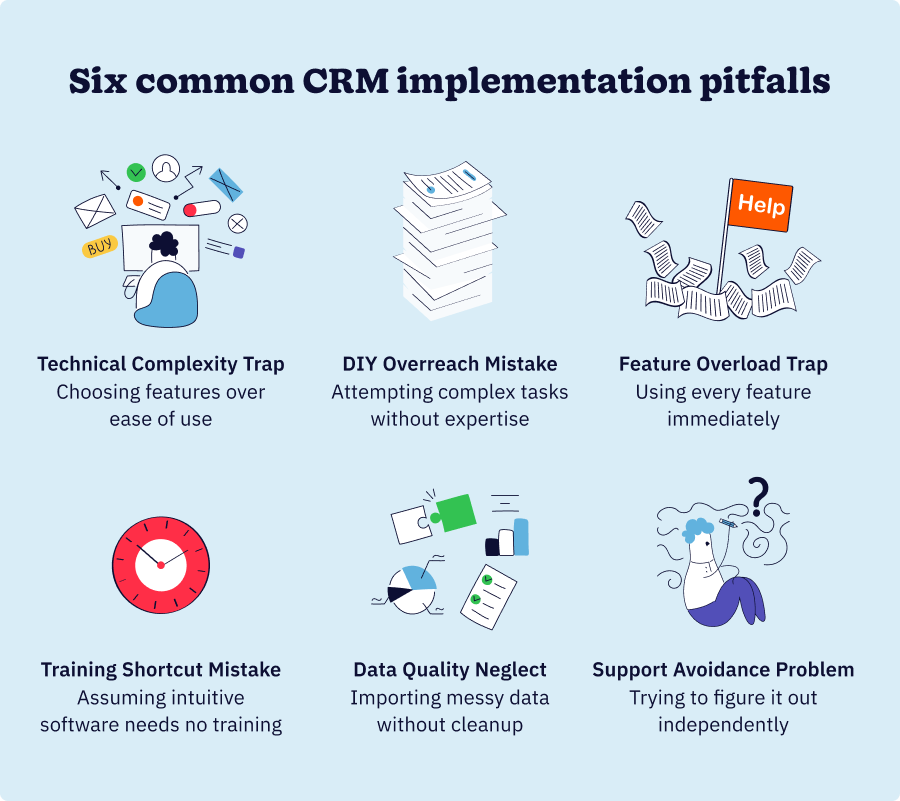
Most pitfalls that derail CRM implementations are entirely preventable. Understanding what typically goes wrong helps you navigate around these obstacles before they impact your implementation.
Nontechnical teams face unique challenges in implementing CRM systems. Learning from common mistakes helps you avoid costly errors.
The 鈥渢echnical complexity鈥� trap
贬别谤别鈥檚 where many small businesses go wrong: They choose a CRM based on its advanced features rather than its ease of use. That鈥檚 backwards. You want to prioritize an intuitive interface and simple setup over the number of features. More features don鈥檛 necessarily equal better results鈥攅asier-to-use features do.
Have your least technical team member try the system. If they struggle to navigate it, it鈥檚 probably not the right fit for your business. Your CRM should feel intuitive to everyone, not just your tech-savvy people.
The 鈥淒IY overreach鈥� mistake
Nontechnical teams sometimes attempt to handle complex technical tasks without the proper expertise, believing they can save money. However, that usually comes at a higher cost in the long run. Know when to ask for help and budget for professional assistance where it matters.
Get help with data migration from complex systems, custom integrations, advanced automation, team training, and system optimization. These are the areas where professional help actually saves you money and headaches.
The 鈥渇eature overload鈥� trap
It鈥檚 tempting to turn on every feature your CRM offers right away. Don鈥檛 do it. You鈥檒l overwhelm your team and slow down the adoption process. Instead, start with core functionality and gradually add features as your team gets comfortable.
Build confidence through small wins. Focus on contact management first, then pipeline management, then automation, and finally advanced features. This approach works because it gives your team time to master each layer before moving to the next.
The 鈥渢raining shortcut鈥� mistake
Some small business owners assume that if software is intuitive, it doesn鈥檛 need training. That鈥檚 not quite right. Even easy systems need some guidance. Your team needs to understand not just how to use the system but why you鈥檙e using it and how it fits into your workflow.
Invest in proper training even for user-friendly systems. Utilize vendor training resources and develop concise internal documentation. It鈥檚 time well spent.
The 鈥渄ata quality neglect鈥� issue
贬别谤别鈥檚 something that trips up many businesses: They import messy data without first cleaning it up. According to industry research, prioritize accurate customer data鈥攁nd that emphasis is well-founded. Bad data in your CRM can lead to poor decisions based on that information.
Clean your data before import using simple spreadsheet techniques. Establish clear and simple data entry standards from the outset to prevent the issue from recurring.
The 鈥渟upport avoidance鈥� problem
Some teams try to solve every problem independently, thinking they鈥檙e being resourceful. But that鈥檚 actually inefficient. Your vendor has support resources, training materials, and user communities specifically designed to help you succeed.
Actively use vendor support, training resources, and user communities. Schedule regular check-ins with support during your first month to ensure a smooth transition. You鈥檙e paying for these resources鈥攎ight as well use them.
Measuring small business CRM success
Without clear metrics, it鈥檚 difficult to know whether your CRM is actually working. These simple indicators help you track progress and demonstrate ROI at key milestones.
Nontechnical teams need simple, visual metrics that directly tie to business results and team comfort with the system.
Immediate success indicators (first 30 days)
The first indications of implementation success include:
- The percentage of team members logging in and using CRM daily
- The percentage of customer records with complete, accurate information
- Whether team members are consistently following new CRM-based processes
- Team confidence level with the system on a simple 1-10 scale
- Whether the need for technical support is decreasing
Short-term success metrics (3-6 months)
Looking ahead, you should keep an eye out for:
- Improvements in the speed of lead follow-up
- The accuracy of sales forecasting using CRM data
- The frequency and quality of customer interactions
- The time from lead to closed deal
- User satisfaction with the system鈥檚 ease of use
Long-term success measures (6+ months)
Key long-term success markers include:
- An increase in sales attributed to improved processes
- Improvement in customer satisfaction and retention rates
- Increase in deals per salesperson
- Ability to handle growth without proportional resource increase
- The team鈥檚 ability to handle routine CRM tasks without external help
Simple ROI calculation
Calculating your CRM implementation ROI involves:
- Calculating the hours saved per week on administrative tasks and multiplying them by the hourly rate
- Tracking additional sales attributed to better follow-up and organization
- Measuring improved conversion rates and faster deal closure
- Assessing the ability to handle more customers without adding staff
- Recognizing improved team morale and reduced frustration
Building your CRM support network
Success with CRM implementation isn鈥檛 just about choosing the right system鈥攊t鈥檚 about building the right support network for ongoing success. A CRM is only as successful as your team鈥檚 ability to use it confidently over time. The right support network ensures your team never feels alone when challenges arise.
Your internal support structure
Designate your most tech-comfortable team member as the go-to person. Pair comfortable users with those who need more help. Hold weekly team meetings to address questions and share best practices and tips. Create visual guides and checklists for common tasks to streamline workflow.
External support resources
You鈥檒l want to understand what vendor support is included with your plan. Join forums and groups specific to your CRM. Identify the best video tutorials and webinars. Find nearby consultants for complex needs.
Your ongoing education strategy
Incorporate learning one new feature per month as team comfort grows. Attend virtual or local user group meetings. Participate in training webinars and product updates. Connect with other small businesses using the same CRM.
Your small business CRM success starts now
You don鈥檛 need to be technical to successfully implement and use a CRM system. Small businesses have unique advantages鈥攁gility, direct impact visibility, and personal investment in success. With the right planning, approach, and support, your CRM can become a powerful engine for growth, managed confidently by your nontechnical team.
Research indicates that roughly , primarily due to poor user adoption and complexity. This guide is designed to help you avoid those pitfalls. The difference between success and failure often comes down to choosing the right approach for your team鈥檚 capabilities.
Your technical limitations don鈥檛 have to limit your business success. With the right planning, the right CRM, and the right support network, you can join the thousands of small businesses that have transformed their customer relationships and accelerated their growth.
The journey begins with an honest assessment of your current situation, strategic planning for your desired destination, and a commitment to taking it one step at a time. You鈥檝e got this.
was produced by and reviewed and distributed by 麻豆原创.